 See Also
Simulator allows the modeling of newer types of Voltage Source Converter DC lines, which use Insulated Gate Bipolar Transistors (IGBT) and Gate Turn-off Thyristors (GTO) to perform pulse-width modulation or multi-level switching. They are also referred to as "HVDC Light" (ABB) or "HVDC Plus" (Siemens).
For power flow purposes, these devices are simple: they completely decouple real and reactive power controls.
There is currently no way to display VSC DC lines on oneline diagrams. However, they are displayed in Bus View (in a similar manner to Multi-Terminal DC Lines), Power Flow, and Quick Power Flow lists.
VSC DC Name
Name of the VSC DC Transmission Line. This is the unique identifier for the device. The dialog field is not editable itself, but the name can be changed with the "Rename" button.
To/From Converter
Gives information about the endpoint buses: the numbers, names, and associated Substations and Areas. These fields are not editable, the information displayed here can only be changed through the buses themselves. The connected buses can be changed on the Converter Parameters tab below.
Status
Allows the line to be opened or closed.
Resistance
Set the resistance of the line.
Converter Parameters Tab
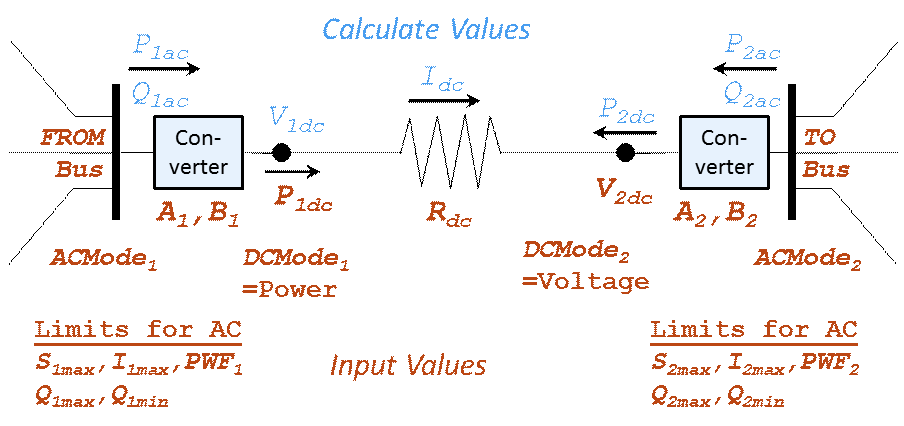
This tab gives control over the parameters for the converters on each end of the line.
Terminal Bus
Allows the connected buses to be set.
DC Setpoint
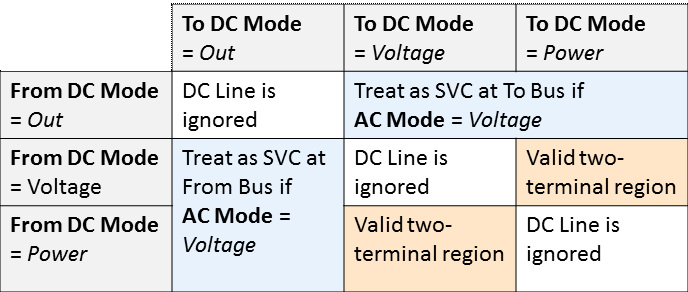
Specifies the DC control mode for each converter, either Out-Of-Service, Voltage, or Power.
DC Setpoint: MW Set Side
Specify whether the DC MW Setpoint is interpreted as the MW flow on the "DC side" or "AC Side" of the converter. If there are not any converter losses modeled then this does not matter.
AC Setpoint
Specifies the AC control mode for each converter, either per unit Voltage or Power Factor. If the AC control mode is set to Voltage and the other converter is out of service, it acts as an SVC.
Regulated Bus, Remote Regulation %
When the AC mode is Voltage, the Regulated Bus does not have to be the converter AC terminal. If this is blank, it signifies it regulated its own terminal. For more information on Remote Regulation, refer to the Generator Information Power and Voltage Control page.
A loss, B loss
The converter losses for each end are defined as: ConverterLosskW = Aloss + Idc*Bloss
Minimum Loss
If this field is specified, it sets a lower bound on the value calculated from Aloss, Bloss and IDC
Maximum AC MVA
Converter MVA rating specified in MVA. If set to 0, there is no limit.
Maximum AC Current
Converter current rating in amps. If set to 0, there is no limit.
Power Weighting Factor
Power weighting factor is a value between 0 and 1. It is used to reduce real and reactive power when limits are hit.
Maximum Mvar
Maximum Mvar injection into the AC network. This is used only when the AC mode is Voltage.
Minimum Mvar
Minimum Mvar injection into the AC network. This is used only when the AC mode is Voltage.
Flows and Voltages Tab
These fields are not editable.
AC MW Flow
The real power flow on the AC side of the converter.
AC MVar Flow
The reactive power on the AC side of the converter.
DC MW Flow
The power flow on the DC side of the converter.
DC Voltage
The voltage on the DC side of the converter, in kV.
DC Line Current
The current flowing on the DC line, in amps.
Custom Tab
Tab containing Custom Fields.
Stability Tab
Tab for configuring the VSCDC Line Model for stability analysis